 Church Chat
Creating a chat
Start a chat for a team, a ministry, or a small group.
Select + beside Chats in the sidebar. Staff can start chats unless your church’s admins keep that to themselves. If you don’t see +, ask an admin to start one for you.
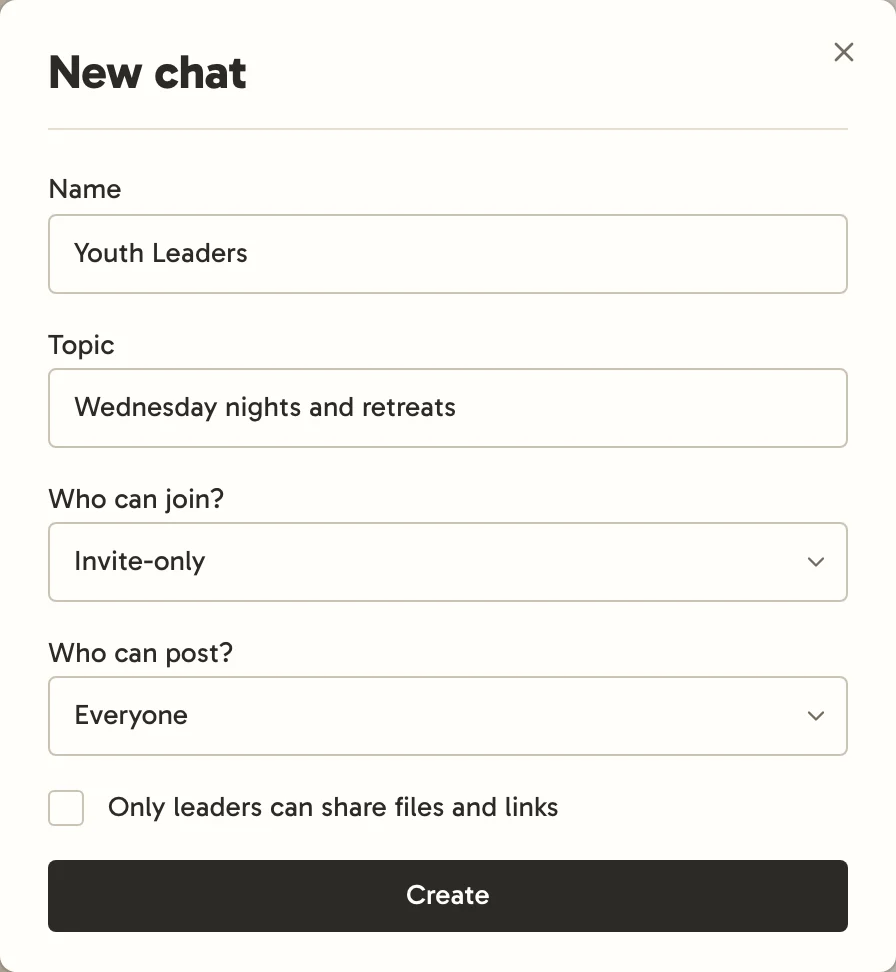
- Name and Topic say what it’s for.
- Who can join? Chats start Invite-only: nobody else can see the chat, church admins included. Open lets everyone at your church find it and join. Open chats have a globe beside their name.
- Who can post? Everyone, or Leaders and selected members, for announcements. An open chat where everyone can post is open to anyone who joins your church, including through its invite link, so the dialog points that out.
Nobody reads a chat without being in it. When someone joins a chat they can post in, a quiet line in the conversation says so, such as "Cody Coleman joined", or "Kari Taylor added Cody Coleman" when someone added them. People who arrive together share one line, like "Cody Coleman, Ashley Blake and 38 others joined" after a Planning Center sync. These lines never count as unread or notify anyone. Nobody is announced in a chat they can only read, like Announcements, or in one with Show member list turned off. Nothing is posted when someone leaves.
Whoever creates a chat leads it. The new chat suggests what to do next: invite people, sync it with Planning Center, repeat it every week, or bring in another church.
Which kind of chat
| For | Try |
|---|---|
| Staff conversations | An invite-only chat of staff |
| A serving team | An invite-only chat, or one that repeats each week with whoever’s serving |
| A ministry, like men’s or women’s ministry | An invite-only chat whose leader invites people, or an open one anyone can join |
| Church-wide news | Announcements, which every church starts with: open, everyone’s in it, only leaders post, and each post notifies everyone |
| A small group or Bible study | An invite-only chat with its leader inviting their own people |
| Working with another church | A cross-church chat |